Articles for every Stamp, Postcard and Aerogramme issued by the Vatican are available to you on the VPS Website. The information was published in the Vatican Notes over the past 67 years.
To access the articles:
- Go to the VPS website (www.vaticanstamps.org)
- Click ‘Member Page’ in the upper right
- Click ‘Indexes’ on the Gold Menu Bar
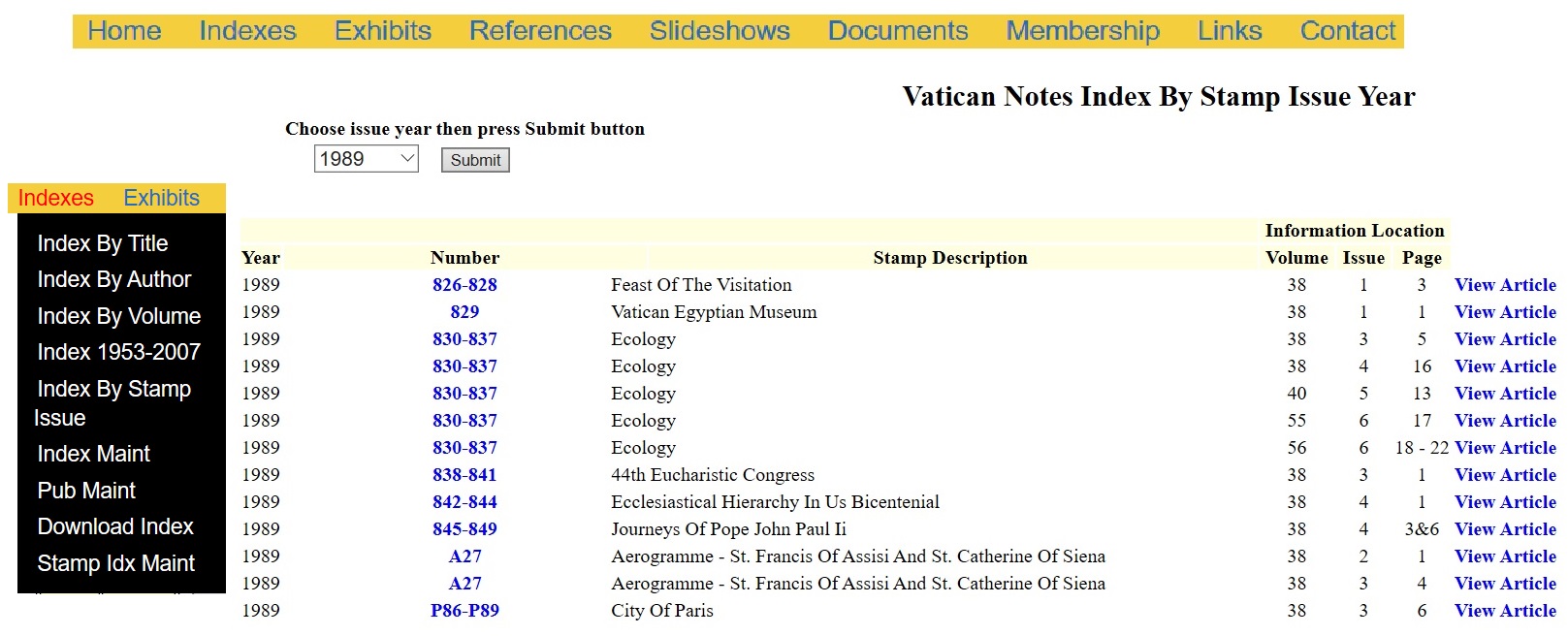
- Click ‘Index By Stamp Issue’ on the Black Menu Box
- Enter the year of the Stamp Issue you choose to search and click ‘Submit’
- A listing of all Stamps, Aerogrammes and Postcards issued that year will appear
- The following information is provided:
- Year - the Year you selected to display
- Number - the catalogue number of the issue. Click on the Number and it will display images of the issue
- Stamp Description
- Information Location - The Volume, Issue and Page where the article can be found in the Vatican Notes
- Click ‘View Article’ to display the article from the Vatican Notes
If there are multiple articles for a specific issue, such as ‘Ecology’( 830-837) and the ‘Aerogramme’ (A27) in the above example, you will be able to access each article in the sequence it was published.
If you have not already done so, access this invaluable feature to add to the knowledge you already have about your Vatican City collection. This is just another benefit of VPS membership. Enjoy!
|